 DualSub Replay
Learn Japanese with YouTube. Tap any word to see its grammar.
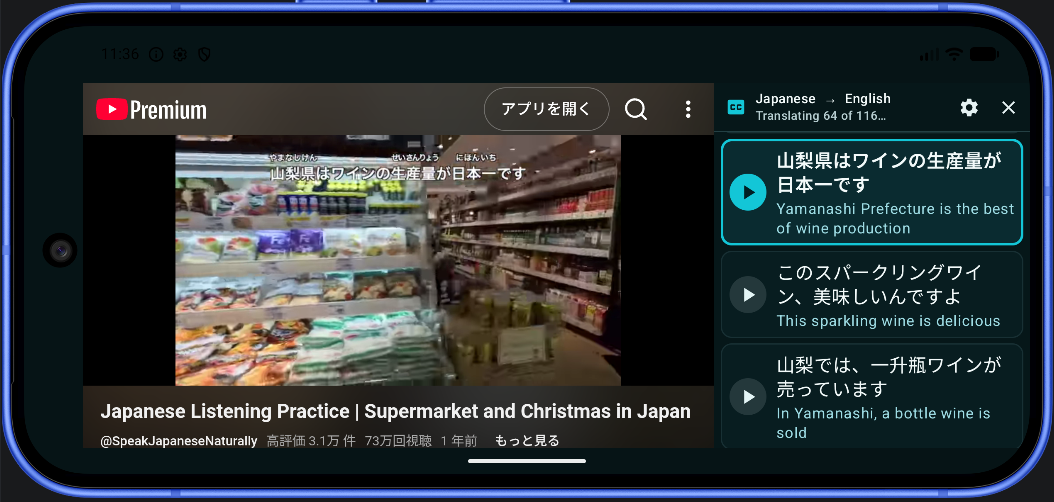
DualSub Replay is a free Android app that shows Japanese captions with a translation underneath. Tap a line to hear it again, or tap a word to see what it means and how the grammar around it works.
Stuck at 100% in the GitHub app? Download from this site instead.
Android 8.0 or newer. No account, no ads, no API key.
Study real Japanese, one sentence at a time
Pick any Japanese video with captions: listening practice, vlogs, cooking, news or anime clips on YouTube. Auto-generated Japanese captions work too.
Japanese and your language together
Every Japanese line has its translation right under it, in English or any of 101 languages, so you never lose the meaning.
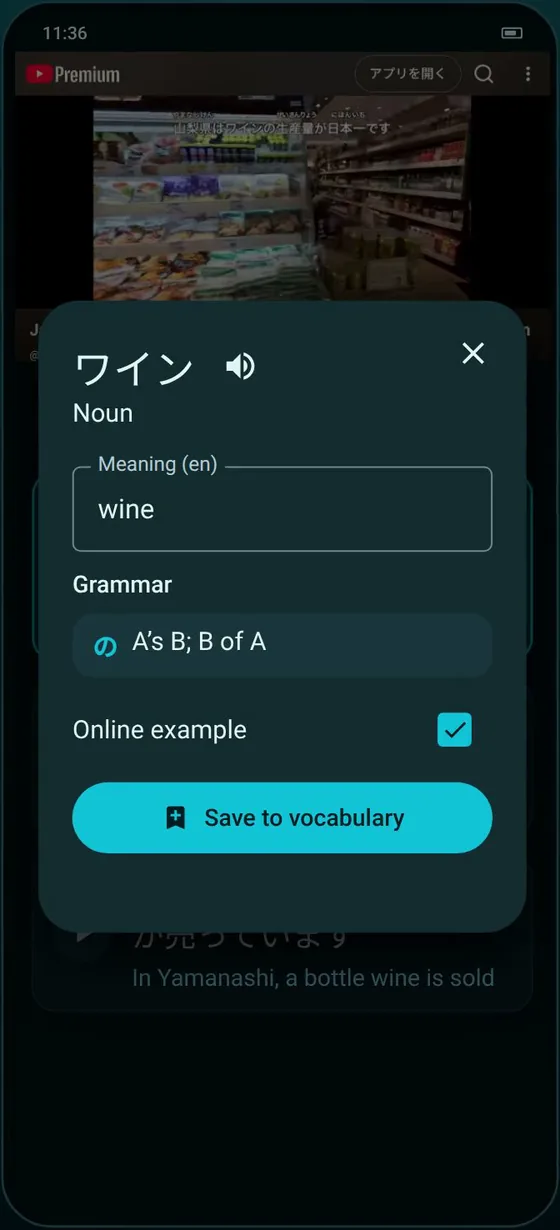
Tap a word to look it up
See the word's meaning and part of speech, and tap the speaker to hear it. Tap a second word in the same line to look up the whole phrase.
Grammar explained
The card names the grammar around your selection, such as the particle after it (に, の, を) or a verb ending like 〜てくれました, without needing the internet.
Replay without scrubbing
Tap a subtitle line and the video jumps back to the start of that sentence. Repeat it as many times as you need.
Save words with their sentence
Each saved word keeps the sentence it came from. Review with spaced repetition, replay the original moment, or export to Anki.
Ask about anything else
Tap Explain the grammar with AI on the word card and the optional AI assistant walks through the whole sentence, using your own Gemini, OpenAI, Claude or OpenRouter key.
How to learn Japanese with YouTube on Android
- Download DualSub-Replay.apk and open it. If Android asks, allow your browser to install unknown apps.
- When the app starts, choose your own language and pick Japanese as the language you are learning.
- Search YouTube for something like “Japanese listening practice” and open a video with Japanese captions.
- Read the Japanese and the translation together. Tap a line to hear it again, and tap words you don’t know to see their meaning and grammar.
- Save the words you want to keep and review them in Practice.
Questions from Japanese learners
Does it work with auto-generated Japanese captions?
Yes. DualSub Replay uses the Japanese captions a video offers, whether the creator wrote them or YouTube generated them. Short caption pieces are joined into readable sentences.
Which grammar points does it explain?
Common particles such as に, の, を and で, verb and adjective endings such as 〜ている and 〜てくれました, and many set expressions. The explanations come from rules built into the app, so they work offline.
Can I export Japanese words to Anki?
Yes. In Practice, choose Export and then Anki text. The file has each word, its meaning, its reading and the original sentence.
Is it free?
Yes. DualSub Replay is free and open source, with no ads, subscriptions or accounts. The AI assistant is optional and uses your own key.
Start learning Japanese with YouTube today
If DualSub Replay helps your Japanese, a star on GitHub helps other learners find it.
Stuck at 100% in the GitHub app? Download from this site instead.